
Shelly BLU Remote Control ZB
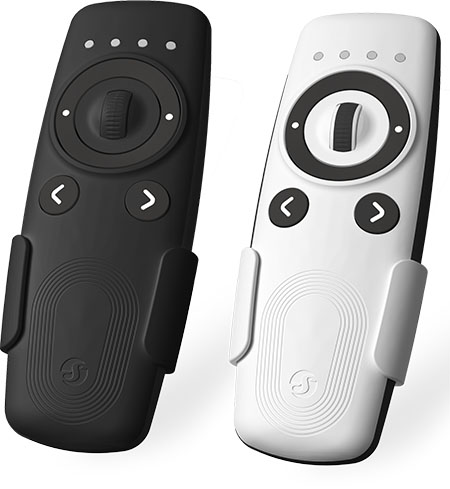
Device Identification
- Device name: Shelly BLU Remote Control ZB
- Device model: SBRC-005B
- Device Bluetooth ID: 0x0009
Short Description
Effortlessly control your smart home with the Shelly BLU Remote Control ZB. This battery-powered remote lets you easily manage your smart home devices via Bluetooth and Zigbee. With four channels, intuitive command buttons, and a precision scroller wheel, it’s perfect for dimming lights or adjusting blinds and shutters.
Built-in gesture control powered by an accelerometer lets you interact with a simple wave or tilt, while the integrated buzzer and LED indicators provide instant feedback.
Pair seamlessly with Shelly Pro, Gen3, and Gen4 devices for easy control via Default Command Mapping. Shelly Plus devices can act as Bluetooth gateways, ensuring effortless connectivity across your home.
Main Features
- Universal control: Supports Bluetooth and Zigbee for flexible, low-latency control of your smart devices.
- Seamless pairing: Connects easily with Shelly Pro, Gen3, and Gen4 devices via Default Command Mapping.
- Multi-channel operation: Switch between four channels with dedicated buttons for seamless control of lights, relays, and covers.
- Built-in gesture control: Integrated accelerometer lets you dim lights or move covers with a simple hand gesture.
- Instant feedback: LED indicators and buzzer provide real-time response for every action.
- Beacon mode: Activate the buzzer to help you quickly locate the remote when it goes missing.
- Broad compatibility: Fully supports Home Assistant and any other device using the BTHome protocol, right out of the box.
- One remote, many devices: Control multiple Shelly devices at once – adjust curtains, dim lights, or toggle relays from a single remote.
Use Cases
- Lighting control – Turn lights on or off, or fine-tune brightness using the scroll wheel or intuitive hand gestures.
- Smart blinds & curtains – Open or close motorized shades with a simple button press, scroll, or gesture – like waving a magic wand.
- Garage door access – Use the remote to open or close your garage door without reaching for your phone.
- Location-based automation – Enable Beacon mode to trigger specific actions when you enter Bluetooth range.
Main Applications
- Residential
- MDU (Multi Dwelling Units – apartments, condominiums, hotels, etc.)
- Light commercial (small office buildings, small retail/restaurant/gas station, etc.)
- Government/municipal
- University/college
Integrations
Amazon Alexa Supported Capabilities
- Doorbell EventSource
Google Smart Home Supported Traits
- No
Samsung SmartThings Supported Capabilities
- No
Connectivity
- Bluetooth
- Zigbee
User Interface
Inputs
Navigation Buttons (< or >):
- Single press: Switches the active control channel (1–4). Channel change is indicated by a beep and flashing of the selected channel LED. If the remote hasn’t been used for a while, the first press will only indicate the current channel.
- Long press: Starts angle measurement using the built-in accelerometer. Upon release, the rotation angle is transmitted in the X, Y, and Z axes – one angle per axis.
- Press 3 times rapidly: Sends a Zigbee Group Identify command to all devices in the group linked to the current channel. The devices will identify themselves for 5 seconds (e.g., blinking bulbs or flashing LEDs).
- Press 4 times rapidly: Enters BLE pairing mode. Indicated by LEDs flashing from left to right. Success shown with 5 slow flashes.
- Press 5 times rapidly: Enters Zigbee inclusion mode. Indicated by LEDs flashing right to left. Success shown with 5 slow flashes. Pressing any button exits inclusion mode.
Ring Buttons (Left or Right):
- Single press: Sends a control command on the active channel.
- Press 3 times rapidly: Sends a Zigbee Group Identify command to all devices in the group linked to the current channel.
- Press 4 times rapidly: Enters BLE pairing mode (same behavior as navigation buttons).
- Press 5 times rapidly: Enters Zigbee inclusion mode (same behavior as navigation buttons).
- Hold for 30 seconds: Performs a factory reset. Success shown by all LEDs flashing once with a beep.
Scroll Wheel:
- Rotate up/down: Adjusts brightness, moves covers, or triggers other actions depending on the paired device.
Outputs
LED Indication (x4 separate channel LEDs):
- Channel change: Selected channel LED flashes twice with a beep when using
<or>buttons. - Command transmitted: Single flash on the LED of the selected channel.
- Device pick up: LED of the current channel flashes after inactivity if the accelerometer is active.
- BLE pairing mode: LEDs flash from left to right. Success indicated by 5 slow flashes.
- Zigbee inclusion mode: LEDs flash from right to left. Success shown with 5 slow flashes and a beep.
- Zigbee Identify: All LEDs flash rapidly 5 times.
- Group identify: LED of the selected channel flashes for 5 seconds while the devices on this channel are identifying themselves.
- Factory reset: All LEDs flash once with a beep.
Default Command Mapping
| Component | Left Ring Button | Right Ring Button | Scroll Wheel Up | Scroll Wheel Down |
|---|---|---|---|---|
| Relay Channel | Off | On | N/A | N/A |
| Cover | Close | Open | Step Up (behavior depends on mode) - Full bottom-to-top rotation = 3 seconds of movement or - Cover moves while wheel is rotated | Step Down (behavior depends on mode) - Full top-to-bottom rotation = 3 seconds of movement or - Cover moves while wheel is rotated |
| Dimmer | Off | On | Dim Up Brightness increases while wheel is rotated | Dim Down Brightness decreases while wheel is rotated |
Supported on specific Shelly Gen3, Gen4, and Pro devices.
How to Set Up Default Command Mapping
Specifications
| Quantity | Value |
|---|---|
| Physical | |
| Size (H×W×D) | 129 × 47 × 24 mm / 5.08 × 1.85 × 0.94 inch |
| Weight | - 63 g / 2.22 oz (without batteries) - 85 g / 3.00 oz (with batteries) |
| Shell material | Plastic |
| Shell color | White, Black |
| Environmental | |
| Ambient working temperature | -20 °C to 40 °C / -5 °F to 105 °F |
| Humidity | 30 % to 70 % RH |
| Max. altitude | 2000 m / 6562 ft |
| Electrical | |
| Power supply | Batteries |
| Battery type | 2× AAA 1.5 V |
| Estimated battery life | Approx. 2 years (depends on battery type, usage, and network strength) |
| Sensors, meters | |
| Accelerometer | Yes |
| Radio | |
| Bluetooth | |
| Protocol | 5 (LE) |
| RF band | 2402 – 2480 MHz |
| Max. RF power | < 8 dBm |
| Range | Up to 10 m / 33 ft indoors Up to 30 m / 100 ft outdoors (Depends on local conditions) |
| Zigbee | |
| Protocols | 802.15.4 |
| RF bands | 2405 to 2480 MHz |
| Max. RF power | < 8 dBm |
| Range | Up to 10 m / 33 ft indoors Up to 30 m / 100 ft outdoors (Depends on local conditions) |
| Microcontroller unit | |
| CPU | EFR32MG27 |
| Flash | 768 kB |
| Firmware capabilities | |
| Schedules | No |
| Webhooks (URL actions) | No |
| Scripting | No |
| MQTT | No |
| Encryption | Yes |
| Other | |
| Supported devices | - Shelly Gen3 / Gen4 series - Shelly Pro series - Shelly Plus series (as Bluetooth Gateway) |
Components and APIs
Compliance and Certification
- Shelly BLU Remote Control ZB Multilingual EU Declaration of Conformity
- Shelly BLU Remote Control ZB UK PSTI ACT Statement of Compliance