
Short description
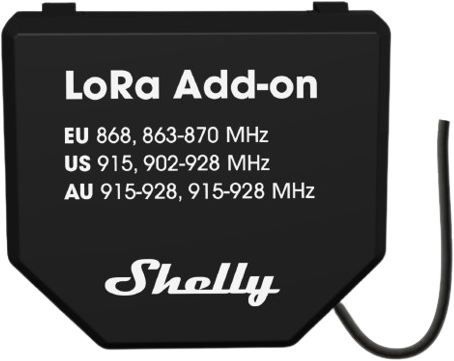
Unlock up to 5 km of reliable communication with the Shelly LoRa Add-on. Designed for Shelly Gen3 and Gen4 devices, it redefines long-range connectivity, delivering secure performance in open spaces and dependable operation even in challenging environments.
Break barriers and extend control where other technologies can't reach. This compact add-on is perfect for automating city infrastructure, managing remote facilities, or optimizing precision agriculture. It supports custom scripts, giving you the flexibility to tailor functionality for the specific use case.
Easy to set up and transformative in its impact. Available now for EU868, with US915 and AU915-928 coming soon.
Main features
- Communicate up to 5 km with ease, thanks to the external antenna.
- Seamlessly integrates with Shelly Gen3 and Gen4 devices for extended communication.
- Built to perform even in obstructed or hard-to-reach areas.
- Quick and simple setup – get started in no time.
- Supports custom scripts to address specific use cases.
Use cases
Smart Street Lighting Automation
Automate streetlights with LoRa-enabled relays for real-time control and monitoring. Adjust lighting schedules based on traffic or weather, monitor energy consumption, and receive fault alerts to reduce maintenance downtime and costs.
Precision Agriculture and Remote Irrigation
Use LoRa-enabled relays to automate irrigation systems and lighting across remote fields. Control pumps, sprinklers, and lighting schedules based on soil moisture, weather data, and operational needs. Monitor environmental sensors and power consumption to optimize water usage, energy efficiency, and crop productivity without requiring on-site management.
Smart Parking Lot Lighting and Management
Deploy LoRa Add-ons on parking lot lights for automated schedules and dimming based on activity. Trigger lights with motion sensors to save energy during low usage and enhance safety. Integrate LoRa communication for fault detection and monitoring, ensuring timely repairs and efficient maintenance.
Warehouse Automation and Control
Automate warehouse lighting zones with dimming or switching to optimize energy usage and enhance visibility. Use LoRa-enabled relays for efficient energy monitoring and fault detection, ensuring seamless operation across large warehouse spaces.
Remote Facility Equipment Control
Use LoRa Add-ons to automate and monitor pumps, lighting, and power systems in remote facilities. Optimize energy consumption by controlling equipment schedules based on operational requirements and environmental conditions. Receive real-time alerts for power or equipment failures, ensuring efficient management and minimal manual intervention.
Main applications
- Residential
- MDU (Multi Dwelling Units – apartments, condominiums, hotels, etc.)
- Light commercial (small office buildings, small retail/restaurant/gas station, etc.)
- Government/municipal
- University/college
- Farming
Connectivity
- LoRa
Add-on Interface
- Shelly proprietary serial interface to connect to a Shelly Gen3 and Gen4 devices
Specifications
| Quantity | Value |
|---|---|
| Physical | |
| Size (HxWxD) | 40 × 42 × 11 mm / 1.58 × 1.66 × 0.44 inch |
| Weight | 10 g / 0.4 oz |
| Mounting | Via the Shelly proprietary serial interface to connect to a Shelly compatible device |
| Shell material | Plastic |
| Shell color | Black |
| Environmental | |
| Ambient working temperature | -20 °C to 40 °C / -5 °F to 105 °F |
| Max. altitude | 2000 m / 6562 ft |
| Electrical | |
| Power supply | 3.3 V (from compatible Shelly device) |
| Power consumption | < 150 mW |
| Compatible devices | |
| Shelly Gen3 Devices: | |
| - Shelly 1 Gen3 | |
| - Shelly 1PM Gen3 | |
| - Shelly 2PM Gen3 | |
| - Shelly Shutter | |
| - Shelly EM Gen3 | |
| - Shelly Dimmer 0/1-10V PM Gen3 | |
| - Shelly DALI Dimmer Gen3 | |
| Shelly Gen4 Devices: | |
| - Shelly 1 Gen4 | |
| - Shelly 1PM Gen4 | |
| - Shelly 2PM Gen4 | |
| Radio | |
| LoRa | |
| RF band | - EU868 - US915 (coming soon) - AU915-928 (coming soon) |
| Max. RF power | < 14 dBm |
| Range | Up to 5,000 m / 16,400 ft (Depends on local conditions) |
Scripting examples
https://github.com/ALLTERCO/shelly-script-examples
Solutions
Troubleshooting
FAQs
Why is my Shelly device not recognizing the Shelly LoRa Add-on?
Please check the following:
- Ensure your Shelly LoRa Add-on is mounted securely on a compatible Shelly Gen3 or Gen4 host device.
- Confirm that the host device is running firmware version 1.6 or later.
- Verify that the LoRa Add-on is properly connected to the proprietary Shelly serial interface (used to connect Add-ons to Gen3/Gen4 devices).
Can multiple Shelly devices transmit data over LoRa via a single Shelly device with a LoRa Add-on? Or do all devices need a LoRa Add-on?
If you have a Shelly Gen3/Gen4 device with a LoRa Add-on acting as a gateway, it can receive data from other devices (including BLU devices via Bluetooth) and forward or process it. For example, data from BLU devices (e.g., BLU H&T) can be collected via Bluetooth by the Shelly device with the LoRa Add-on and transmitted over LoRa. This setup requires custom scripting, and template scripts for transmitter and receiver use cases are available. You can refer to the examples in our GitHub:
- For Shelly device that acts as LoRa gateway and listens to Bluetooth devices
- For Shelly device that receives data over LoRa
Recommendation: For the simplest and most robust setup, it is recommended that each Shelly device that needs LoRa communication has its own LoRa Add-on.
Is the Shelly LoRa Add-on limited to a one-to-one connection, or can it support multiple devices?
The Shelly LoRa Add-on supports flexible communication topologies:
- It can operate in one-to-one, one-to-many, and many-to-one configurations.
- You need at least one transmitter and one receiver, but you can also have:
- One sender communicating with multiple receivers
- One receiver receiving data from multiple transmitters
- Multiple transmitters and multiple receivers
- To ensure reliable communication, avoid multiple transmitters sending data simultaneously (radio collisions).
- All Shelly LoRa Add-ons must use the same LoRa configuration (frequency, bandwidth, spreading factor) for proper communication.
Can I still use the standard functionality of a Shelly Gen4 device when it has a LoRa Add-on?
Yes. The device can simultaneously operate as a LoRa communication point and a locally controlled Shelly device.
What is the LoRa Spreading Factor (SF), and how should I use it?
The LoRa Spreading Factor (SF) defines the trade-off between range, data rate, and airtime:
- Lower SF (e.g., SF7): shorter range, faster transmissions, more messages per hour.
- Higher SF (e.g., SF12): longer range, longer airtime, fewer messages per hour.
When using multiple devices, set the SF based on the farthest device in the network to ensure reliable communication for all nodes.
Why did my Shelly LoRa Add-on suddenly stop transmitting, even when the sender and receiver were very close?
This is most likely caused by the LoRa Safety Stop, triggered when transmission limits are exceeded:
- In EU868, LoRa devices are subject to regulatory duty cycle limits (typically 0.1% per hour per sub-band).
- The Shelly LoRa Add-on implements a Safety Stop mechanism to prevent misconfiguration or excessive transmissions.
- The Safety Stop is triggered when 25% of the recommended hourly transmission time is reached.
- Once triggered, further transmissions are blocked regardless of distance.
- Transmissions resume automatically once hourly usage drops below the limit.
How do I configure the US915 frequency band on my Shelly LoRa Add-on?
When using the US915 region, the Shelly LoRa Add-on must operate with frequency hopping to meet FCC requirements:
- Select US915 as the region in the device settings.
- A 64-frequency hopping sequence is required:
- Can be generated automatically using the built-in tool in the web interface, or
- Manually enter a frequency list (validated for FCC compliance before saving).
- Transmissions always start from the first frequency in the sequence.
- Mandatory delay between transmissions:
- 20 seconds for 125 kHz bandwidth
- 10 seconds for 250 kHz bandwidth
These requirements ensure the LoRa Add-on operates in compliance with FCC regulations in the US915 band.
Compliance and certification
- Shelly LoRa add-on multilingual EU declaration of conformity
- Shelly LoRa Add-on UK PSTI ACT Statement of compliance