
Shelly Shutter Gen3
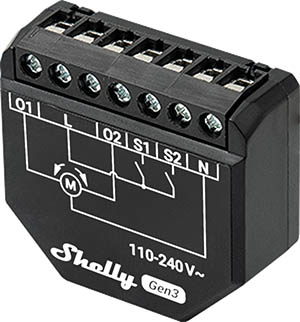
Device Identification
- Device name: Shelly Shutter
- Device model: S3SH-0A2P4EU
- Device SSID: ShellyShutter-XXXXXXXXXXXX
- BLE Model ID: 0x1039
Short Description
Shelly Shutter is a compact cover controller with power measurement, enabling remote control of shutters, shades, and blinds via mobile phone, tablet, PC, or home automation systems. It operates standalone on a local Wi-Fi network or through cloud-based home automation services. The device supports Venetian blinds.
Remote access is possible from anywhere with internet connectivity, provided the device is connected to a Wi-Fi router. It can be retrofitted into standard electrical wall boxes behind switches for covers.
The device features an embedded web interface for monitoring, control, and configuration of settings.
Main Features
- Smart Cover Controller with Power Measurement: Monitors energy usage of connected covers, shutters, or blinds.
- Compact Design: Small form factor suitable for retrofitting into standard electrical wall boxes.
- Remote Control: Control electric appliances remotely via mobile devices or home automation systems.
- Local and Cloud Control: Functions both locally on Wi-Fi and via cloud services.
- Improved Processor and Memory: Enhanced performance with upgraded hardware.
- Remote Access: Full remote monitoring and control from any internet-connected location.
- Embedded Web Interface: Built-in web UI for configuration and real-time monitoring.
- BLE Gateway: Bridges Shelly BLU devices to the wider Shelly ecosystem by forwarding Bluetooth signals to the cloud or other non-BLE devices.
- Wi-Fi Range Extender for IoT Devices: Boosts and extends Wi-Fi signal coverage for nearby IoT devices.
- Scripting: Supports Shelly Script Language
- Wide Range of Integrations: Compatible with third-party home systems via HTTP API, MQTT(s), Webhooks (HTTP/HTTPS), UDP.
- KNX Support: Native support for KNXnet/IP communication.
- Schedules: Advanced scheduling with support for date, time, weekdays, hours, minutes, and seconds.
- Virtual Components: Dynamic virtual components available via Shelly API Docs
- KNXnet/IP Support: Detailed integration guide available here
- Venetian Blinds Mode: Enables remote control of motorized blinds, roller shutters, awnings, etc. Measures power consumption. Requires motors with electronic or mechanical limit switches properly configured before connection.
Use Cases
- Blinds Control: Automate and remotely manage shutters, blinds, and awnings.
- Power Monitoring: Real-time tracking of energy use for improved efficiency.
- Home Automation: Integrate into custom scenes and schedules within your smart home system.
- Energy Efficiency: Identify high-energy-consuming devices and optimize usage.
- Remote Monitoring: Monitor and control devices even when away from home.
Main Applications
- Residential
- MDU (Multi Dwelling Units – apartments, condos, hotels)
- Light Commercial (small offices, retail stores, restaurants, gas stations)
- Government/Municipal
- University/College
Integrations
Amazon Alexa
Yes
Google Smart Home
Yes
Samsung SmartThings
Yes
Device Electrical Interfaces
Inputs
- 2 switch/button inputs on screw terminals: S1 and S2
- 3 power supply inputs on screw terminals: 1 N (+) and 2 L (Ʇ)
Outputs
- 2 relay outputs with power measurement (on screw terminals)
Add-on Interface
- Shelly proprietary serial interface
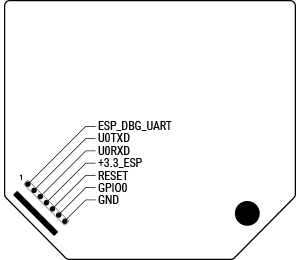
⚠ CAUTION! High voltage present on add-on interface when powered.
Connectivity
- Wi-Fi
- Bluetooth
Safety Functions
- Overheating protection
- Overvoltage protection
- Overcurrent protection
- Overpower protection
- Obstacle detection
- Safety switch
Supported Load Types
- Inductive loads: Bi-directional AC motors for roller shutters, blinds (including Venetian blinds), and awnings with compensated power factor
User Interface
Inputs
- One (Control) Button
- Press once briefly during pairing mode to connect with a Shelly BLU device.
- Hold for 5 seconds to enable Device Access Point and Bluetooth.
- Hold for 10 seconds to perform a factory reset.
Outputs
- LED (Monochrome Indicator)
| LED State | Behavior |
|---|---|
| AP enabled, Wi-Fi disabled | 1 sec ON / 1 sec OFF |
| Wi-Fi enabled, not connected | 1 sec ON / 3 sec OFF |
| Connected to Wi-Fi network | Constantly ON |
| Cloud enabled, not connected | 1 sec ON / 5 sec OFF |
| Connected to Shelly Cloud | Constantly ON |
| OTA Update in progress | ½ sec ON / ½ sec OFF |
| Button held for 5 sec | ½ sec ON / ½ sec OFF |
| Button held for 10 sec | ¼ sec ON / ¼ sec OFF |
Note: Higher-priority states override lower ones.
Specifications
| Category | Value |
|---|---|
| Physical | |
| Size (H×W×D) | 37×42×16 ±0.5 mm / 1.46×1.65×0.63 ±0.02 inch |
| Weight | 30 g / 1.06 oz |
| Screw terminal max torque | 0.4 Nm / 3.5 lbin |
| Conductor cross section | 0.5 to 4 mm² / 20 to 11 AWG (solid, stranded, bootlace ferrules) |
| Conductor stripped length | 6 to 7 mm / 0.24 to 0.28 in |
| Mounting | Wall box |
| Shell material | Plastic |
| Shell color | Black |
| Terminals color | Black |
| Environmental | |
| Ambient working temperature | -20°C to 40°C / -5°F to 105°F |
| Humidity | 30% to 70% RH |
| Max altitude | 2000 m / 6562 ft |
| Electrical | |
| Power supply | 110–240 V~ 50/60 Hz |
| Power consumption | < 1.4 W |
| External protection | Tripping characteristic B or C, max 16A rated current, min 6 kA interrupting rating, energy limiting class 3 |
| Output Circuit Ratings | |
| Max switching voltage | 240 V~ |
| Max switching current AC | 4 A (for motors with compensated power factor – inductive loads) |
| Supported motor type | Single-phase AC motors |
| Required limit switches | Electronic or Mechanical |
| Sensors & Meters | |
| Voltmeter (AC) | Yes |
| Ammeter (AC) | Yes |
| Internal temperature sensor | Yes |
| Radio | |
| Wi-Fi | |
| Protocol | IEEE 802.11 b/g/n |
| RF band | 2412 – 2472 MHz |
| Max RF power | < 20 dBm |
| Range | Up to 30 m indoors / 50 m outdoors (varies by environment) |
| Bluetooth | |
| Protocol | 4.2 |
| RF band | 2402 – 2480 MHz |
| Max RF power | < 4 dBm |
| Range | Up to 10 m indoors / 30 m outdoors (varies by environment) |
| Microcontroller Unit | |
| CPU | ESP-Shelly-C38F |
| Flash | 8 MB |
| Firmware Capabilities | |
| Schedules | 20 |
| Webhooks (URL actions) | 20 with up to 5 URLs per hook |
| Scripting | Yes |
| MQTT | Yes |
Basic Wiring Diagram
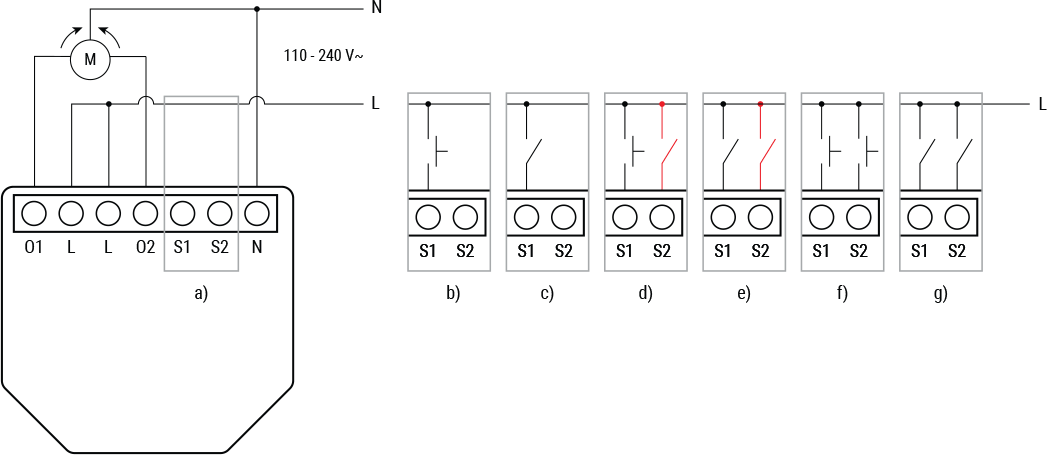
Legend
| Terminal | Function | Wire | Function |
|---|---|---|---|
| O1, O2 | Load circuit output terminals | N | Neutral wire |
| N | Neutral terminal | L | Live wire (110–240 V~) |
| L | Live terminal (110–240 VAC) | ||
| S1, S2 | Switch input terminals |
Shelly Smart Control
Compliance
- Shelly Shutter multilingual EU Declaration of Conformity (2025-07-22)
- Shelly Shutter UK PSTI ACT Statement of Compliance
Compliance Archive
Printed User Guide
Additional language resources:
Components and APIs
Installation Guides
- Pairing Shelly Shutter with Shelly BLU Button Tough 1
- Pairing Shelly Shutter with Shelly BLU RC Button 4
Additional language guides: