
Shelly DALI Dimmer Gen3
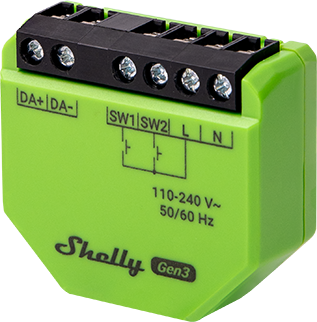
Device Identification
- Device name: Shelly DALI Dimmer Gen3
- Device model: S3DM-0A1WW
- Device SSID: ShellyDDimmerG3-XXXXXXXXXXXX
- Device Bluetooth ID: 0x1071
Short Description
The Shelly DALI Dimmer (the Device) is a gateway device between the Shelly ecosystem and APIs, and a DALI network of lights. It can control DALI-capable light sources that contain DALI control gear.
In terms of DALI, it is a single-master application controller, supporting LED control gear (Part 207), which does not share the bus with other DALI control devices. The Shelly DALI Dimmer controls all connected DALI control gear as a single group using broadcast messages.
The device contains a bus power supply capable of controlling up to X non-powered bus units.
It can be accessed, controlled, and monitored remotely from any location with internet connectivity, provided it is connected to a Wi-Fi router and the Internet.
It features an embedded Web Interface for monitoring and controlling the device, as well as adjusting its settings.
Main Features
- DALI Application Controller: Supports DALI bus control in a single-master configuration for direct or indirect DALI control gear lights.
- DALI Features: Controls light intensity of attached control gear (DT6). Color temperature control is not supported.
- DALI Power On Default: Off
- DALI On Bus Failure: Turn on at 100%
- Shelly Plus Add-on Compatible: Supports connection with sensor interface to Shelly Plus devices.
- Switch/Button Input Mode: Flexible input control via switches or buttons.
- One/Dual Button Dimming Control: Full functionality support for dimming control with any wall switch configuration.
- Night Mode: Set specific brightness levels during nighttime.
- Min/Max Brightness: Reframes dimming signal range for more precise brightness control.
- Button Fade Rate: Controls how quickly output brightness changes when holding a button.
- Transition Duration: Controls time for dimming from 0% to 100%.
- Weekly Schedules: Supports daily schedules and routines including brightness, transition duration, and flip value of dimming signal.
- Auto On/Off Timers: Enables automatic on/off timer settings.
- Local Actions: Create automation scenarios within the local Wi-Fi network (brightness, transition duration, flip value).
- Webhooks: Supports lightweight, event-driven communication with other devices.
- BLE Gateway: Facilitates communication between BLE and Wi-Fi-enabled devices.
- Wi-Fi Range Extender: Retransmits Wi-Fi signal to extend reach.
- Scripting: Allows creation of automation scenarios through scripts.
- Compatibility: Highly compatible with third-party home automation systems.
- KNX: Supports KNXnet/IP communication.
- No Need for Hub: Ready for use locally or remotely via Shelly Smart Control or third-party systems.
Use Cases
- Add DALI lights to a Shelly ecosystem
- Use Shelly interfaces (application, local APIs) to control DALI lights
Integrations
Amazon Alexa Supported Capabilities
- Brightness Controller
Google Smart Home Supported Traits
- Brightness
Samsung SmartThings Supported Capabilities
- Color Control
Simplified Internal Schematics
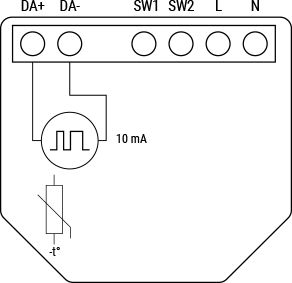
Device Electrical Interfaces
Inputs
- 2 switch/button inputs on screw terminals: S1 and S2
- 2 power supply inputs on screw terminals: N and L
Outputs
- 2 DALI bus lines: D+ and D-
Add-on Interface
- Shelly proprietary serial interface
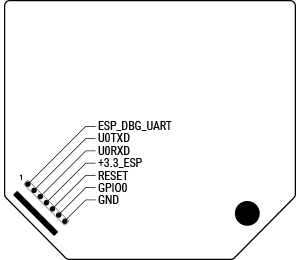
⚠ CAUTION! High voltage present on the add-on interface when the device is powered!
Connectivity
- Wi-Fi
- Bluetooth
Safety Function
- Overheating protection
Supported Load Types
- Can control up to 5 DALI bus units.
- Rated current of internal power supply: 10 mA.
- Bus units must be externally powered.
- Contains DALI bus power supply with maximum output current < 35 mA.
User Interface
Inputs
- One (Control) button:
- Press and hold for 5 seconds → Enable device access point and Bluetooth connection.
- Press and hold for 10 seconds → Factory reset the device.
Outputs
- LED (monocolor) indication:
- AP enabled, Wi-Fi disabled: 1 sec ON / 1 sec OFF
- Wi-Fi enabled but not connected: 1 sec ON / 3 sec OFF
- Connected to Wi-Fi network: Constantly ON
- Cloud enabled but not connected: 1 sec ON / 5 sec OFF
- Connected to Shelly Cloud: Constantly ON
- OTA (Over-the-Air Update): ½ sec ON / ½ sec OFF
- Button pressed and held for 5 seconds: ½ sec ON / ½ sec OFF
- Button pressed and held for 10 seconds: ¼ sec ON / ¼ sec OFF
Note: The list starts with initial device status and lowest priority. Each subsequent state cancels the previous one.
Specifications
| Quantity | Value |
|---|---|
| Physical | |
| Size (HxWxD) | 42 x 37 x 17 mm / 1.65 x 1.46 x 0.66 in |
| Weight | 18 g / 0.63 oz |
| Screw terminals max torque | 0.4 Nm / 3.5 lbin |
| Conductor cross section | 0.5 to 1.5 mm² / 20 to 16 AWG (solid, stranded, bootlace ferrules) |
| Conductor stripped length | 5 to 6 mm / 0.20 to 0.24 in |
| Mounting | In-wall, suspended ceilings |
| Shell material | Plastic |
| Shell color | Green |
| Environmental | |
| Ambient working temperature | -20 °C to 40 °C / -5 °F to 105 °F |
| Humidity | 30 % to 70 % RH |
| Max. altitude | 2000 m / 6562 ft |
| Electrical | |
| Power supply | 110 – 240 VAC ±10%, 50/60 Hz |
| Power consumption | < 2 W |
| Neutral not needed | No |
| Output circuits ratings | |
| Bus power supply | Guaranteed 10 mA (up to 5 DALI control gear units); short circuit current < 35 mA |
| Bus voltage | 16 V nominal |
| Sensors, meters | |
| Internal temperature sensor | Yes |
| Radio | |
| Wi-Fi Protocol | 802.11 b/g/n |
| RF Band | 2401 – 2495 MHz |
| Max. RF power | < 20 dBm |
| Range | Up to 30 m / 100 ft indoors, 50 m / 160 ft outdoors (Depends on local conditions) |
| Bluetooth | |
| Protocol | 4.2 |
| RF Band | 2400 – 2483.5 MHz |
| Max. RF power | < 4 dBm |
| Range | Up to 10 m / 33 ft indoors, 30 m / 100 ft outdoors (Depends on local conditions) |
| Microcontroller unit | |
| CPU | ESP32-C3 Shelly |
| Flash | 8 MB |
| Firmware capabilities | |
| Schedules | 20 |
| Webhooks (URL actions) | 20 with 5 URLs per hook |
| Scripting | Yes |
| MQTT | Yes |
| Encryption | Yes, TLS 1.2 |
Basic Wiring Diagrams
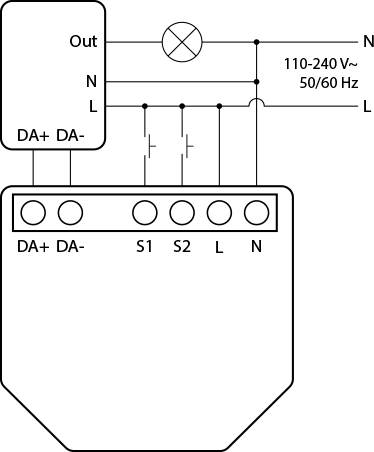
Legend
| Terminals | Description | Wires | Description |
|---|---|---|---|
| N | Neutral terminal | N | Neutral wire |
| L | Live (110–240 V~) terminal | L | Live (110–240 V~) wire 50–60 Hz |
| Out | Dali dimmer load output | — | — |
| S1, S2 | Switch input terminals | — | — |
| DA+ | Dali interface positive terminal | — | — |
| DA- | Dali interface negative terminal | — | — |
Troubleshooting
Ensure the device is properly powered:
- Check power cables, outlets, and any power indicators on the device.
Inspect Connections:
- Verify that all connections (cables, wiring) are secure and properly seated. Loose connections may cause malfunction.
Review Device Settings:
- If applicable, check and confirm configurations match your intended use.
Update Firmware/Software:
- Check for available firmware/software updates. Keeping updated resolves known issues and improves performance.
Restart or Reboot:
- Turn off the device, wait a few seconds, then power it back on. This can resolve temporary glitches.
Check Network Connection:
- Ensure network settings are correct. Test connectivity and consider restarting routers/switches if needed.
Inspect Physical Components:
- Look for signs of damage, overheating, or abnormal behavior.
Check Compatibility:
- Confirm compatibility with other system components (hardware/software).
Monitor Environmental Factors:
- Consider temperature and humidity levels.
Inspect Power Supply Quality:
- Poor power quality (voltage spikes/fluctuations) may affect performance. Use surge protectors or voltage regulators if necessary.
These are general troubleshooting steps. Specific procedures may vary by issue. If problems persist, contact Shelly Technical Support.
Shelly Smart Control
Shelly Web User Interface
Components & APIs
Compliance
- Shelly DALI Dimmer Gen3 Multilingual EU Declaration of Conformity (2025-07-22)
- Shelly DALI Dimmer Gen3 AU/NZ Certificate for Suitability
- Shelly DALI Dimmer Gen3 UK PSTI ACT Statement of Compliance
Compliance Archive
Printed User Guide
Additional Language Resources
Installation Guides
Filter by label
There are no items with the selected labels at this time.